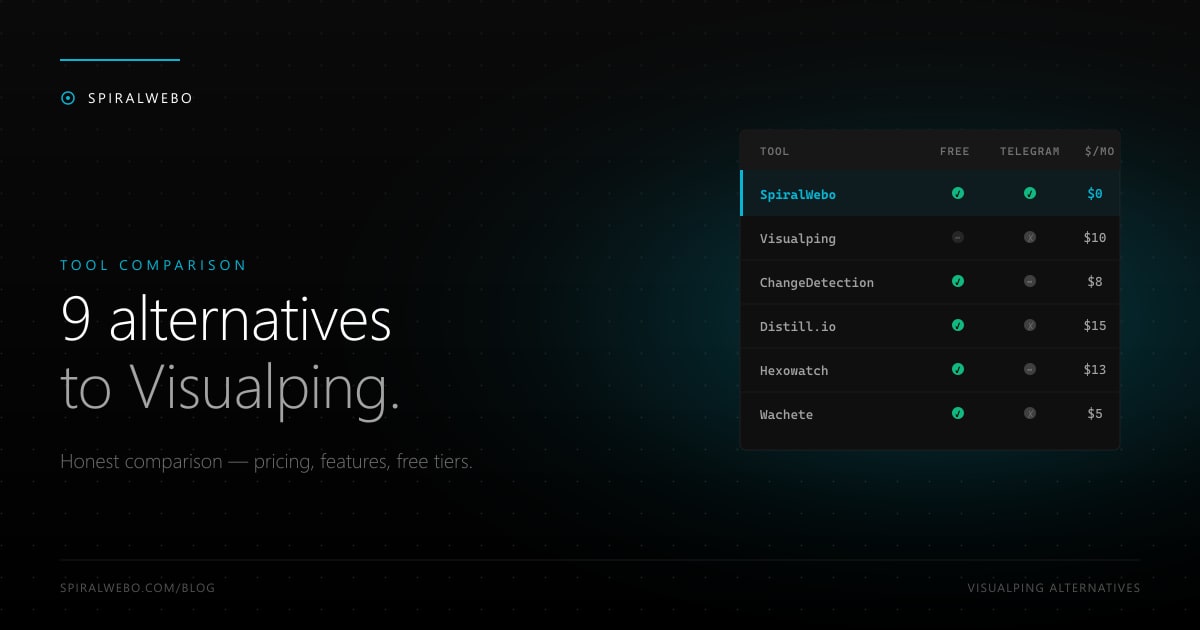
Visualping pioneered the visual-diff category and still owns the #1 spot in Google for "website change monitoring." But the product is built for a specific user, and if you're not that user, you're probably overpaying — or living without features you'd actually use, like Telegram alerts. This guide compares 9 honest Visualping alternatives across pricing, free tiers, notification channels, and the kinds of monitoring each one is actually good at. We've used all of them. No affiliate links, no sponsored placements.
Why people look for a Visualping alternative
Visualping is a perfectly capable tool. So why do people search for alternatives? In our user research, the same handful of reasons keep coming up:
- Pricing. The free plan caps at 5 pages with daily checks. The first paid tier is $10/month for 50 pages, jumping to $50/month for 250. For tracking dozens of pricing pages or restocks, this gets expensive fast.
- No native Telegram support. Visualping does email, Slack, and webhook. If you live outside the US tech bubble — Eastern Europe, MENA, CIS, Southeast Asia — Telegram is the default messaging app, and getting alerts there means wiring up Zapier yourself.
- Visual-only mindset. Visualping defaults to screenshot diffs, which catch banner changes but miss code-only changes. For SEO monitoring or precise price tracking, element-level (CSS/XPath) is what you actually want.
- Feature lock-in. Higher check frequencies, scheduled monitoring, and team features are gated behind progressively more expensive plans.
None of these are deal-breakers in isolation. Together, they're why people reach for this guide.
How we evaluated each alternative
For each tool we tested the same use case: monitor 5 product pages on Walmart, Amazon, and Target for price changes, with alerts going to a single channel. We tracked four things:
- Free tier generosity — pages, frequency, channels included
- Cheapest paid tier — when you outgrow free, what does it cost?
- Notification channels — email, Telegram, Slack, webhook, push, SMS
- Setup difficulty — minutes to first working monitor
Now the lineup. All prices in USD as of 2026.
The 9 best Visualping alternatives
1. SpiralWebo — best for Telegram-first workflows
Free plan: 1 page, hourly checks, all notification channels including Telegram. Paid: from $0 (the project is in growth mode). Setup: 2 minutes.
Where it wins: Telegram is a first-class channel — the bot connects in 3 clicks and alerts arrive in seconds. Visual selector tool generates CSS automatically. Where it loses to Visualping: no screenshot-based visual diff (yet).
If you live in a Telegram-heavy market or run a small team that wants alerts in a shared channel without setting up Slack or PagerDuty, this is the obvious pick. See the Telegram setup guide.
2. ChangeDetection.io — best open-source / self-hosted
Free plan: unlimited pages if you self-host. SaaS plan from $8.99/month. Setup: 30 minutes for self-host, 5 minutes for SaaS.
Open-source. Massive community. Excellent at price tracking and restock detection — restock alerts is literally listed as a top use case on their landing page. Webhook support is solid, which means Telegram-via-webhook is achievable with a little glue code. The self-hosted option means truly unlimited pages at zero cost forever, if you can run a Docker container.
3. Distill.io — best for power users who want granular control
Free plan: 25 pages, 6-hour minimum interval. Paid: from $15/month for hourly checks.
The most flexible selector configuration of any tool in this list. Browser extension lets you point-and-click any element on any page. Has a loyal following among researchers and developers, but the UI is dense and the learning curve is real. The 6-hour free-tier minimum interval makes it a poor fit for time-sensitive use cases like restocks.
4. ChangeTower — best for compliance & audit trails
Free plan: 3 monitors. Paid: from $7/month.
Aimed at businesses, with compliance monitoring as the headline use case. Stores full snapshots for audit trails — every detected change includes the before-and-after with timestamps. If you're a legal team monitoring 40+ regulation pages, or a compliance officer who needs evidence the page changed at 2:47 PM, this is purpose-built. Less of a fit for shoppers and SEO marketers.
5. Hexowatch — best feature breadth (13 monitoring modes)
Free plan: 1 monitor with weekly checks. Paid: from $13/month.
Hexowatch supports 13 distinct monitoring modes: visual, HTML element, content keyword, source code, technology stack, WHOIS, sitemap, RSS, broken backlinks, availability, JSON, and more. It's the swiss-army knife of the category. The trade-off: each monitor costs more (the credit-style pricing system bills per check), and the dense UI takes time to learn.
6. Wachete — best on a tight budget
Free plan: 5 pages, hourly checks. Paid: from $4.90/month for 50 pages.
The cheapest serious entry tier in the category. Simple UI, hourly free-tier checks (more generous than Visualping or Distill), and email/SMS/push notification channels. No Telegram. Best fit: budget-conscious users who don't need Slack/Telegram and just want an email when something changes.
7. UptimeRobot — best if you also need uptime monitoring
Free plan: 50 monitors at 5-minute intervals (uptime focus, change detection added more recently). Paid: from $7/month.
Started as an uptime monitor and added website change detection in 2024. The free tier is the most generous in raw monitor count, but change-detection-specific features (visual selector, change history viewer) lag behind purpose-built tools. The right pick if you're already using UptimeRobot for uptime and want change detection in the same dashboard.
8. Monity.ai — best AI summarization
Free plan: limited AI credits. Paid: from $15/month.
The newer AI-first entrant. Pairs page checks with "agent-style" automations — you can ask it in plain English to log into a page, click a filter, scrape a value, and summarize the change. Powerful but pricier per check, and the AI summarization can hallucinate on edge cases. Best for non-technical users who'd rather describe what they want in English than configure CSS selectors.
9. Sken.io — best clean UX for non-technical users
Free plan: 3 monitors, hourly. Paid: from $9/month.
Simple, minimalist interface. Email and webhook notifications. No advanced features, no learning curve. If your needs are basic (track 3–10 pages, email me when they change) and you don't want to think about XPath or selectors, Sken delivers exactly that.
Quick decision tree
Reading 9 tool descriptions is a lot. Here's the short version:
- Want Telegram alerts? → SpiralWebo
- Want to self-host (free forever)? → ChangeDetection.io
- Need an audit trail for compliance? → ChangeTower
- Need to monitor 50+ types of things (WHOIS, RSS, code)? → Hexowatch
- Cheapest paid tier with email alerts? → Wachete ($4.90)
- Already using UptimeRobot for uptime? → UptimeRobot
- Want AI to summarize the change for you? → Monity.ai
- Simplest possible UX? → Sken.io
- Power user who lives in CSS selectors? → Distill.io
If you're price-sensitive AND want Telegram, SpiralWebo's free plan covers it without compromising. If you're enterprise and need an audit trail, ChangeTower is worth the premium. Everyone else picks based on the specific feature gap they had with Visualping.
Frequently asked questions
Is Visualping still worth using?
Yes — for the specific use case of visual-only monitoring (banners, layout, images, marketing pages where text changes don't matter as much as design changes). Visualping's screenshot diff is the best in the category. For everything else, the alternatives above match or beat it on specific dimensions.
What's the absolute cheapest option?
Self-hosted ChangeDetection.io is free forever (you pay for hosting — $5/month VPS). Among hosted SaaS, Wachete at $4.90/month and SpiralWebo's free plan are the cheapest serious options.
Can I migrate my Visualping monitors to another tool?
Visualping doesn't offer a bulk export. You'll re-enter the URLs manually in your new tool. The good news: most of the alternatives have a visual selector that's faster than Visualping's, so re-creating 20 monitors usually takes under 30 minutes.
Which alternative has the best free tier?
Three contenders depending on what "best" means: ChangeDetection.io (unlimited if self-hosted), UptimeRobot (50 monitors but uptime-focused), and SpiralWebo (Telegram included, no other free tier offers that). For pure page count: Distill (25), Wachete (5), SpiralWebo (1), Visualping (5). For more on free tiers see our free-tier deep dive.
What if I need to monitor JavaScript-rendered pages?
All paid tiers of the tools above support JS rendering. On free tiers it varies — Visualping and ChangeDetection.io include it, others gate it. For details see our guide on monitoring JavaScript-rendered pages.
The honest takeaway
There's no single "best" Visualping alternative. There's the best one for what you specifically need — and most often that's "Telegram-first, free, simple," in which case SpiralWebo wins. For visual fidelity Visualping still leads. For self-hosted control ChangeDetection.io wins. For breadth Hexowatch wins.
If your gripe with Visualping is pricing or notification channels, try SpiralWebo's free plan first — it takes two minutes to evaluate and costs nothing. Start free →. If you're solving a different problem, the table above will point you to the right tool.